
This post contains affiliate links. We may earn a small commission when you buy through our links — at no extra cost to you.
Almost every digital alarm clock on the shelf claims large numbers, a dimmer, and a loud alarm. In practice, ‘dimmable’ often means the lowest setting still glows like a nightlight, and ‘loud’ rarely comes with a decibel number. The real buying decision is matching the display and alarm behavior to your bedroom, not trusting the front of the box.
The biggest trade-off is size versus sleep darkness. A larger display is easier to read from across the room, but a bigger backlight usually means more residual glow at night. Clocks that solve this well use a wide brightness range or a red LED that preserves darkness while remaining readable.
The same logic applies to wake-up volume: a clock can be loud and still be adjustable, but heavy sleepers need to verify the maximum level rather than assume ‘alarm clock’ means loud enough. Focus on brightness range, digit height, and alarm adjustability, and the right bedside clock becomes obvious.


Best for Simple Bedside Use
DreamSky Small Alarm Clock
Two-inch jumbo digits, a genuinely adjustable dimmer, and a USB charging port make the DreamSky a compact all-rounder for a standard bedroom. The numbers are legible from across the room and stay sharp from pillow height, while the brightness dial drops low enough to keep a subtle nightlight effect without washing the walls in glow. The USB port lets a phone charge at the bedside without a second adapter, a real convenience when outlets are scarce. The larger 3-inch model in the same lineup reads from farther away; this one trades a bit of reach for a smaller nightstand footprint.
Alarm volume adjusts from gentle to assertive, the 9-minute snooze works as expected, and a weekend alarm-off setting covers the weekday-only crowd. That volume control is missing on several clocks at this price tier. The controls are simple enough for kids and adults to set without a manual, and there is no app or assistant to pair. You set the time, set the alarm, and the clock handles the rest.
This fits typical bedroom users who want a large-display clock without a bulky base, and it is a practical pick for seniors or visually impaired users who need big numbers at a glance. It also replaces a dedicated phone charger on the bed table, so the nightstand ends up with one device instead of two. Buyers who want maximum distance legibility might prefer the 3-inch sibling, but that clock takes up more table space.
The main tradeoffs sit on the timekeeping side: a unit can drift a few minutes per month, and DST/hour changes are manual. For typical users that is a quick button fix; for anyone who needs precise time or automatic updates, this clock will be a recurring nuisance.
Pros
- 2-inch jumbo digits stay readable across the room and suit weaker vision.
- Dimmer cuts brightness from vivid to a low glow, easing nighttime glare.
- Compact base keeps a full-size display without swallowing the nightstand.
- USB port offers a dedicated phone charge spot without an extra outlet.
Cons
- Only one alarm time; couples or roommates on separate schedules need a second clock.
- Even the lowest dimmer setting leaves a faint glow, so strict-darkness sleepers should expect some light.
The compact DreamSky is the practical default for a typical bedroom: large digits, a dimmer that goes genuinely low, USB charging, and a footprint that leaves room for the rest of your nightstand.
Best for Seniors, Low Vision
DreamSky Large Alarm Clock
The DreamSky’s 3-inch digits are readable from across a room without glasses, and the 0-100 dimmer wheel goes from near-black to bright enough for daytime. That puts it ahead of the compact 2-inch option for anyone who needs maximum distance readability rather than a small footprint.
This clock suits seniors, visually impaired users, and anyone who checks the time from a desk or across the bedroom without reaching for glasses. The large display makes it a bulky nightstand presence, and a single alarm means couples on separate schedules need a second clock. Some units lose a few minutes per month, and the back-panel alarm button can be confused with neighboring buttons.
A built-in USB port handles overnight phone charging, and the adjustable alarm volume covers typical bedrooms. This is not a heavy-sleeper siren, so buyers who need a loud wake-up blast should look to the high-volume alarm specialist in this set.
Pros
- 3-inch jumbo digits are readable from across the room without glasses.
- Dimmer wheel spans from near-black to very bright, adapting to dark bedrooms and bright rooms.
- Strong build quality and simple controls keep everyday use fuss-free.
Cons
- Timekeeping can drift by a few minutes each month, so occasional resetting is part of ownership.
- The alarm on/off button on the back is identical to the other buttons, so it can be pressed by mistake.
This is the clock for anyone who wants the time readable from across the room before anything else.
Best for Projection Users
Mesqool Projection Clock
Unlike the compact non-projection pick in this lineup, the Mesqool’s reason to exist is the 180° rotatable projector. It pairs with a 7-inch main display and dual alarms, so time appears overhead and on the nightstand without needing a second clock. The projected image can be aimed at a wall or ceiling, and the numerals remain legible without glasses. The large main readout stays the fallback when the projection isn’t aimed toward the bed.
People who want ceiling visibility at a glance, couples with separate wake schedules, and anyone who prefers a large display in a compact footprint are the natural audience. The honest boundary is the strict-darkness question: the lowest dimmer setting can still produce visible glow, and projection sharpness can vary by unit depending on focus and wall distance. Buyers who want a simple clock without the projector mechanics are better served by the top pick.
Pros
- Rotatable projector puts the time on the ceiling or wall without lifting your head.
- 7-inch LED main display stays readable from across a bedroom.
- Dual alarms and simple controls handle two wake schedules with minimal setup.
Cons
- Projection sharpness can vary with focus and ceiling distance, so image quality depends on placement.
- At its lowest dimmer setting, the 7-inch display can still throw enough glow to bother light-sensitive sleepers.
For a mid-range price, this adds ceiling projection without giving up a large main display or dual alarms.
Best for Couples, Roommates
PPLEE Dual Alarm Clock
Two independent alarms and a 7.5-inch display give the PPLEE an edge over single-alarm budget clocks. Volume tops out at 106dB, so the alarm can reach across a large bedroom or compete with a heavy fan. Dedicated buttons for time and each alarm keep setup quick. Each alarm has its own on/off control, so an early riser can silence their wake-up without clearing the second alarm.
Couples or roommates with different wake-up times are the intended audience: each alarm is set separately, and the display stays readable from across the room. Long-term durability is the main caveat; a budget clock this feature-dense can vary between units, so treat it as a value purchase rather than a long-term fixture. The five-level dimmer gives several brightness options, and the USB port adds a phone-charging spot at the bedside.
Pros
- Two independent alarms let each sleeper set a separate wake-up schedule.
- Large 7.5-inch display stays readable from across the room.
- Dedicated controls and a simple setup make time and alarm changes fast.
Cons
- Light-sensitive sleepers may still see glow on the lowest dimmer setting.
- Heavy sleepers who need an instant loud blast may find the gradual volume ramp too slow.
This is the budget-friendly dual-alarm pick when one bedroom houses two different morning routines.
Best for Travel, Cordless
Peakeep Battery Alarm Clock
Runs on three AAA batteries, so it needs no wall outlet and can sit on a nightstand, desk, or camping shelf. The built-in ambient light sensor adjusts the backlight automatically, and the indoor temperature readout adds a useful layer of information without extra cords. The LCD digits are large enough to read from across the room, the controls are simple enough for a guest or child to operate, and the three-level nightlight includes an off setting for tighter control.
Alarm reliability is uneven across units; an occasional unit may stop sounding after a few months, which makes this a better fit for travelers, campers, kids’ rooms, and desks that lack easy outlet access. Heavy sleepers who need a loud alarm and anyone wanting USB charging will be better served by the compact plug-in models in this lineup. For a secondary clock in a cabin, dorm, or child’s room, the cordless freedom outweighs those caveats.
Pros
- Fully battery powered, so placement is only limited by where you want the clock.
- Setting time and alarm is simple, with controls that don’t require a manual.
- Large LCD digits stay readable across a room, and the temperature readout adds useful information at a glance.
Cons
- The nightlight brightness is a matter of taste; the lowest setting may be too bright for sensitive sleepers, while others want more glow.
- Only one alarm time, so couples with different wake-up schedules will need a second clock.
For a shelf, desk, tent, or kid’s room where an outlet is scarce, the Peakeep delivers a readable display and useful extras in a genuinely cordless, budget-friendly package.
Best for Heavy Sleepers
Odokee Alarm Clock
Five selectable wake sounds and up to 110dB of adjustable alarm volume make the Odokee one of the loudest bedside clocks in this guide. The 2-inch bold LED digits stay readable from across a room, an 8-color nightlight doubles as low-level ambiance, and a rear USB port charges a phone without a second charger. Alarm settings, including the wake sound and volume, adjust from the front buttons without a maze of menus.
This clock suits a heavy sleeper who wants one very loud wake-up call and enjoys a colored nightlight. The single alarm and 9-minute snooze cover one-person schedules; couples or roommates with different wake times will get more from the dual-alarm budget option in this guide. It is not for bedrooms that must be completely dark at night, and quality control can vary between units.
Pros
- Five wake sounds and up to 110dB of adjustable volume get through to deep sleepers.
- 2-inch bold digits and a bright display are easy to read without glasses.
- 8-color nightlight adds useful bedside ambiance with multiple settings.
Cons
- In a fully dark bedroom, the lowest dimmer step can still cast a visible glow.
- After several months, a unit’s battery backup may not preserve time and alarm settings during a power cut.
Heavy sleepers who want alarm volume that registers and a colored nightlight will get more from this Odokee than from quieter all-rounders.
Best for Budget Basics
Amazon Basics Alarm Clock

The Amazon Basics oval clock keeps the bedside setup simple: clear green display, easy controls, and a compact footprint for tight nightstands. It sits below the top pick because the 0.7-inch display lacks a true dimmer and the alarm volume is modest — fine for a guest room, kid’s room, or minimalist’s desk, but not for heavy sleepers or light-sensitive sleepers. Battery backup can be inconsistent, so treat it as a convenience after a power outage.
Pros
- Simple controls make setting the time and alarm a fast, no-fuss process.
- Compact oval shape fits small nightstands and cramped desks.
Cons
- No USB port leaves the phone needing a separate charger.
- Single alarm only covers one schedule, so a second person would need their own clock.
For a secondary nightstand or desk that just needs the time and a snooze, this oval clock is a simple, no-clutter buy.
Best for Large Red Display
Sharp Swivel Alarm Clock

The Sharp Swivel Alarm Clock offers large red LED digits on a base that tilts to aim the readout where needed — a budget-friendly bedside clock. The high/low switch is easy, but the low setting stays bright in a dark bedroom, and some units can emit a faint hum. Alarm volume is modest, so heavy sleepers may need a backup. Near-black dimming and louder wake-up output are elsewhere, which keeps it out of the top tier. For buyers who want a large, aimed red display above all, it fits.
Pros
- Large red LED digits are readable from across the room.
- Swivel base lets you angle the display for easier viewing.
Cons
- No USB port for overnight phone charging.
- Single alarm, so two people on different schedules need a dual-alarm model.
For a bedside setup centered on legibility, the swivel base and big red digits make this a sensible low-cost pick.
Best for Day/date Orientation
Raynic 11.5-inch Day Clock
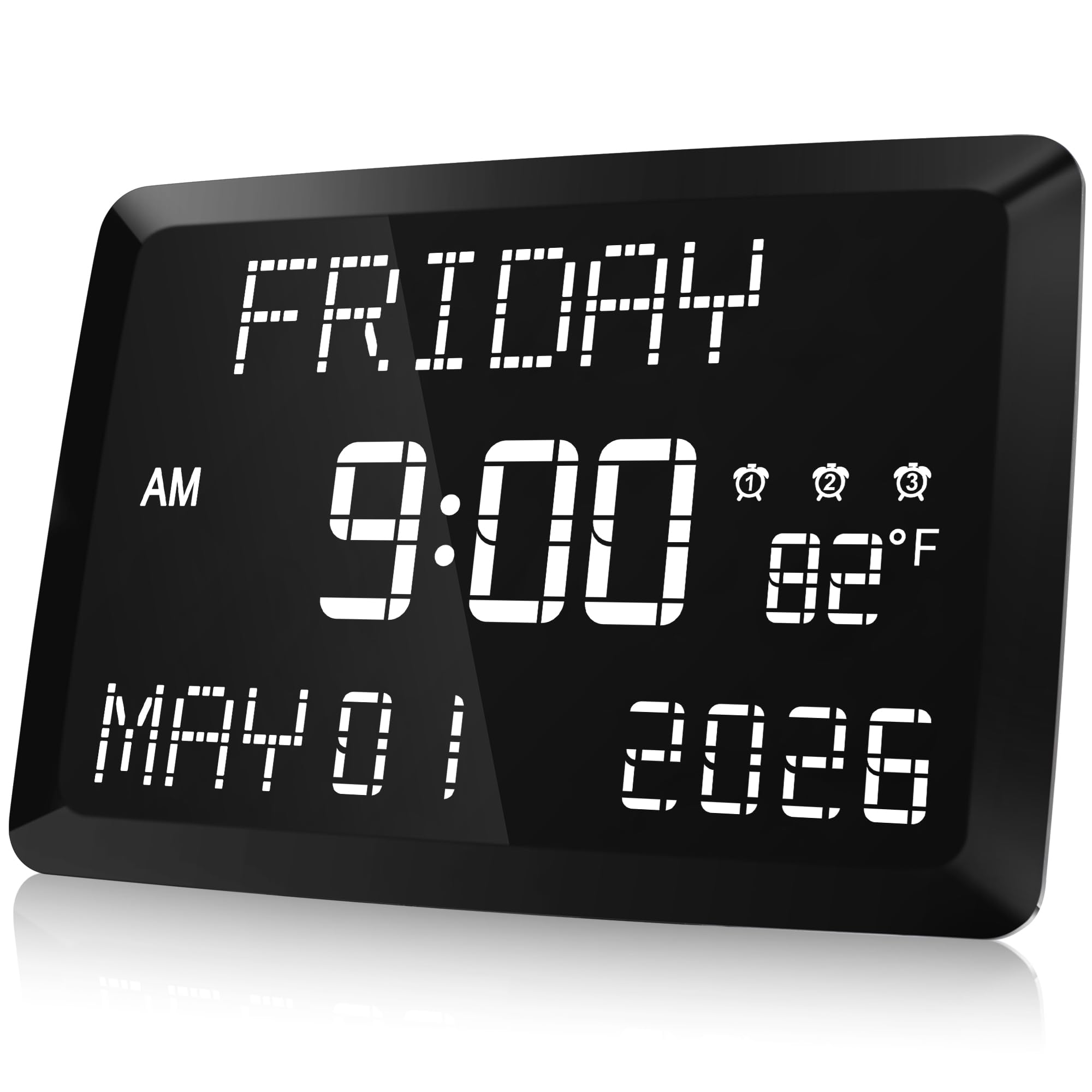
For an 11.5-inch display that puts day, date, indoor temperature, and time in one readable view, this is a useful memory-care or senior-room hub. The five-level dimmer covers bright rooms to dark bedrooms. Dot-matrix characters are less crisp than standard 7-segment digits at close range, and occasional units can develop power issues after months of use. It is premium-priced and bulky for a plain nightstand, which is why the senior-care specialist with 3-inch digits stays ahead for readability. Orientation needs outweigh the footprint, so those limits are acceptable.
Pros
- Extra-large display shows day, date, time, and indoor temperature clearly from across the room.
- Multiple alarms and dual USB ports cover shared schedules and charging needs.
Cons
- Dot-matrix digits are softer than standard 7-segment characters, especially at close range.
- Alarm buttons sit on the back, so the clock must be lifted or reached around to set them.
For a senior-care or memory-care room, the large day/date display makes the size and premium price worthwhile.
Best for Compact Nightstands
Peakeep Compact Clock

The Peakeep Compact Clock fits large digits into a small footprint, with a six-level dimmer and color options for tight nightstands. The single alarm has five volume levels and a nine-minute snooze; battery backup preserves settings during brief outages. It sits below the compact DreamSky because the cord is short and the lowest brightness can still glow in a very dark room. This suits minimalists and travelers who want a simple plug-in clock.
Pros
- Small footprint keeps large digits readable without taking over a tight nightstand.
- Six-level dimmer with color options gives flexible control over bedroom glow.
Cons
- No USB port at the bedside for charging a phone overnight.
For a small nightstand or travel bag where keeping surface space clear is the priority, this is a budget-friendly pick.
How to Choose
A digital alarm clock is bought on display size and judged by how well its brightness disappears at night.
Digit Height and Display Size
Digit height determines both readability and nighttime glow. Larger digits need a larger backlight, and that backlight is what keeps a dark room bright. Choose the smallest display that is readable from your pillow.
Need to read from across the room? Step up to a 3-inch display with a wide dimmer. For a nightstand only, a 2-inch display is usually enough.
Brightness Range and Night Mode
‘Dimmer’ is not a standardized spec; some clocks still glow like nightlights on the lowest level. Red LEDs dim more cleanly than blue or white displays. Look for a wheel or OFF setting rather than a high/low toggle.
If the dimmest level is not stated, expect some residual glow. Strict-darkness sleepers should pick a red-display clock with an OFF mode.
Alarm Loudness and Adjustability
‘Loud’ on the box is not a decibel reading. Heavy sleepers should look for a maximum near 100-110 dB and adjustable levels.
A gradual ramp suits light sleepers but can let deep sleepers oversleep. Check whether the clock blasts immediately or fades in.
Dual Alarm Support
True dual alarms let each sleeper set an independent wake time with separate on/off controls. Couples need that separation; shared or linked alarms create schedule conflicts.
Confirm the clock has two separate alarm buttons or menus. Front-facing controls make early-morning changes easier.
Power Source and Battery Backup
Plug-in clocks with battery backup usually use it for memory only: the display stays dark, but the time and alarms are restored after an outage. That is enough for most bedrooms.
Battery-only clocks work anywhere but need regular AAA changes. For a fixed nightstand, AC power with memory backup is the dependable choice.
FAQ
Why is my digital alarm clock still too bright on the dimmest setting?
Most ‘dimmable’ clocks use a minimum brightness set by the LED color and display size, not by your room. Red LEDs generally dim lower without losing legibility, while blue and white displays keep a visible glow. If the lowest setting is still too bright, a dark film or a red-display clock with an OFF mode solves it. Match the clock to your room’s darkness instead of fighting the display every night.
Does a battery backup alarm clock still show the time when the power goes out?
In most plug-in clocks, battery backup preserves the time and alarm settings; it does not keep the display running. After an outage, the clock restores the saved time instead of blinking 12:00. Fully battery-powered clocks run normally without AC power but drain AAA batteries. If continuous display during outages matters, choose a battery-only model.
How many decibels does an alarm clock need to wake a heavy sleeper?
Typical alarm clocks sit around 60-80 dB, enough for light sleepers but not for deep ones. Heavy sleepers should target a maximum volume near 100-110 dB with adjustable levels. A ramping alarm that starts soft can work if you tolerate gradual volume, but deep sleepers often need an immediate blast. Pick the decibel ceiling that matches your sleep depth rather than the loudest marketing claim.
Why does my alarm clock lose a few minutes every day?
Quartz timekeeping drifts a few minutes per month in many clocks because temperature changes affect the internal oscillator. This can happen at any price point, so it is not a quality judgment. If a clock drifts, check for a hidden time-correction setting; if none exists, a radio-synced clock is the only hands-free fix.